 |
Ftp |
Version: 14.7.04
- Put an image at disposal in the Internet per Ftp.
(Directly, without additional Ftp-software!)
- Generate an image automatically every n seconds and put these images at disposal in the Internet or Intranet per Ftp.
(E.g. PC or server supervision per Internet.)
- Transfer each file per Ftp, over the menu item "Send to" of the Windows Explorer.
(The necessary program is available also after the installation.)
Procedure:
Enter the accounting informations under Settings  Options:

- You have to specify a subdirectory only, if you don't want to transfer the image into the main directory.
(Enter the name of the subdirectory without the slash at the end of the name, e.g. bilder_pc_03)
- "Use only temporary file" is necessary only, if you want to open files, change them and transfer them with Ftp without saving before the transfer.
If you want to transfer the actual image of the Hardcopy window, please use the menu "File".


If you want to generate an image with a keystroke or a mouseclick and transfer it per Ftp after that,
please use "Settings Functions".
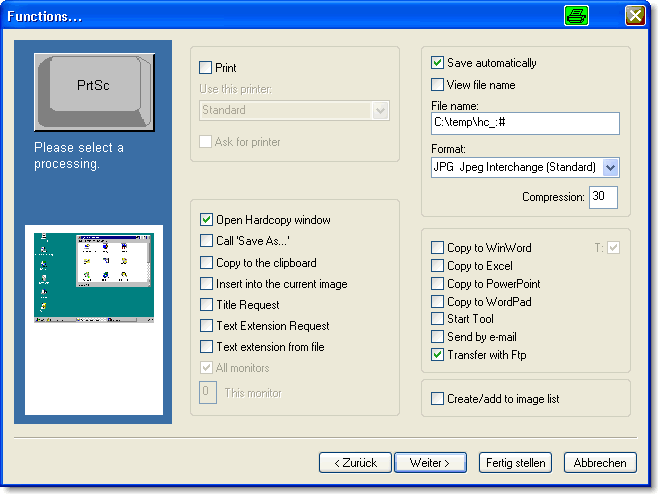
In this example the actual screen is saved automatically in the JPG-format with pressing of the PrtSc key
and transferred per Ftp after that.
Letzte Änderung / Last update: 07.05.2026 08:54:32